
People & team management

Get the foundations right, once.

Employee records, teams, reporting lines, work patterns and permissions - the setup everything else in Teamli quietly depends on.

This is the least glamorous part of an HR system and the part that decides whether the rest of it works. Who reports to whom. Who works which days. Who is allowed to open a sickness record. Get it right at setup and everything downstream behaves; get it wrong and you spend a year correcting leave balances by hand.

Teamli keeps one record per person, grouped into teams that match how your business actually runs, with a work pattern each and a role that decides what they can see. From there, leave requests route to the right approver, part-time absence is deducted correctly, and policies assign themselves to the people they apply to.

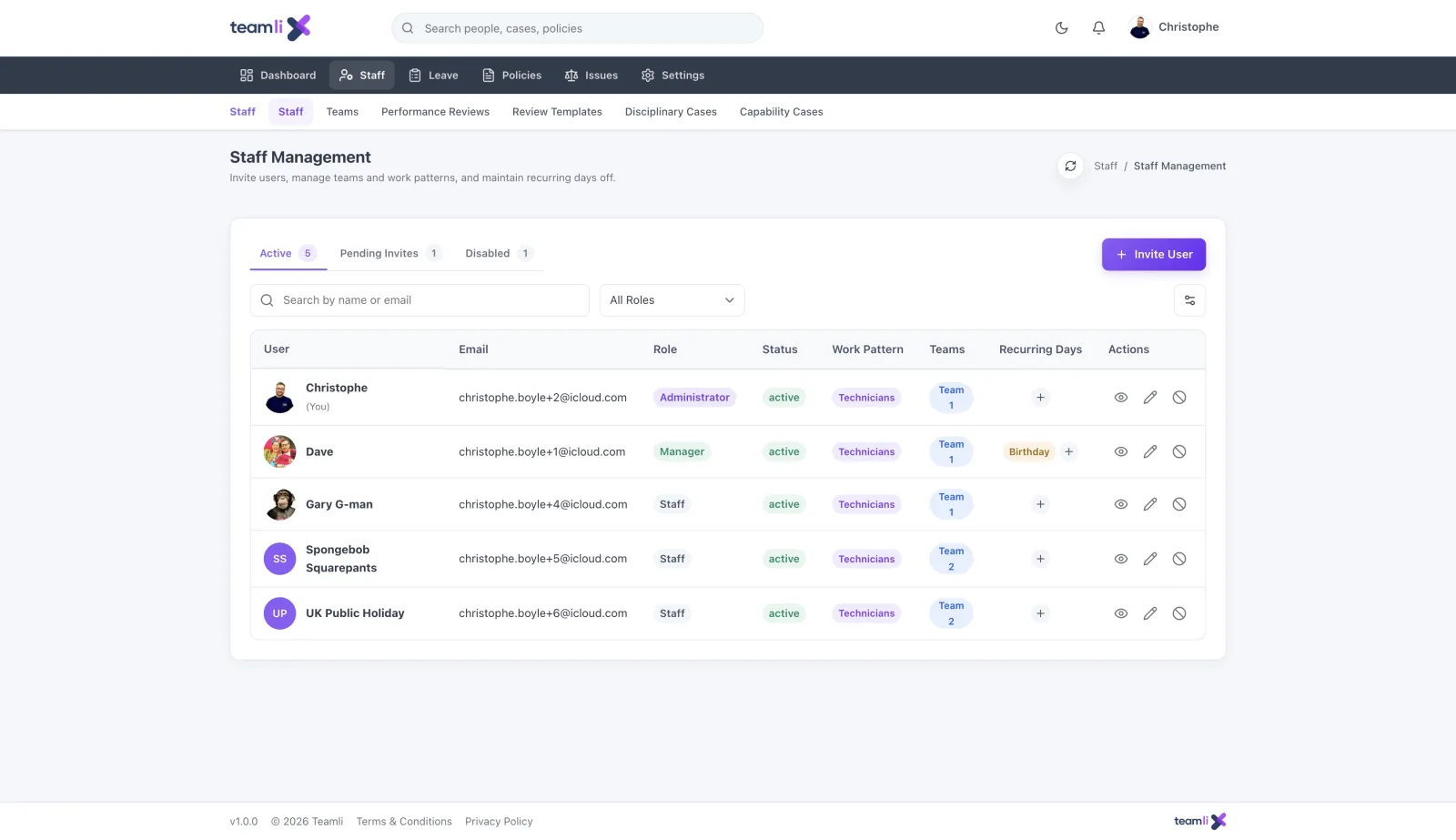
Teamli staff management, listing each person with their role, status, work pattern, team and recurring days off, plus tabs for active users, pending invites and disabled accounts.

The setup that makes everything else work.

Configured once, quietly doing its job every day after that.

Employee directory

One record per person, with the employment details you actually need.

Teams & departments

Group people the way your business is actually organised.

Reporting lines

Set who approves for whom, so requests route themselves.

Invitations

Invite by email, and let people set their own password securely.

Roles & permissions

Build roles from permission bundles rather than ticking boxes per person.

Work patterns

Full-time, part-time, compressed hours and shift patterns per person.

Two-factor authentication

Optional email-based 2FA on any account holding people data.

Company settings

Regional settings, default language, branding and compliance preferences.

Email templates

Edit every transactional email - approvals, reminders, invites - in your own words.

Branded email

Add your logo so what lands in an inbox looks like it came from you.

Secure file storage

Attach documents to a person, an absence or a case, held encrypted.

Audit logs

Who changed what, when, and from where - on every sensitive action.

Getting your team in

Invite people by email and they set their own password - you never handle anybody else's credentials. New starters land with the role you chose, in the team you put them in, on the work pattern they actually work, which means their leave allowance is right from day one rather than after the first correction.

Roles, not tick boxes

Permissions are bundled into roles, so you decide once what a manager can see and apply it to every manager. An HR admin opens a case file; a line manager sees their team's leave but not their sickness detail; an employee sees their own record. Sensitive modules stay closed to everyone you have not explicitly let in, and every access is written to the audit log.

Work patterns that reflect reality

Full-time, part-time, compressed hours, a regular non-working Wednesday - each person carries their own pattern, and Teamli does the maths against it. Public holidays apply by region, so a team spread across the UK and Ireland is not manually adjusted twice a year.

Communications in your own voice

Every transactional email is an editable template, from the leave approval to the policy reminder, and your logo goes on the lot. The point is not vanity: an email that looks like it came from your company gets opened, and an approval nobody opens is an approval that does not happen.

People management FAQs

What does the people side of Teamli do?

It is the foundation the rest of the platform sits on: one record per employee, grouped into teams, with reporting lines, work patterns, roles and permissions. Get that right once and leave requests route to the correct approver, part-time absence is deducted correctly, and policies assign themselves to the right people.

How do we get our team onto Teamli?

Invite people by email. They accept the invite, set their own password, and land in the account with the role you gave them - you never handle anyone else’s password. You can invite in bulk when you are setting up, and one at a time as people join.

Can we control who sees what?

Yes, and with an HR system you should. Permissions are bundled into roles rather than set per person, so a manager, an HR admin and an employee see quite different things. Sensitive records - sickness, fit notes, case files - are visible only to the roles you authorise, and every access is logged.

Does it handle part-time and shift workers?

Each person has their own work pattern covering their working days and hours, so a part-timer booking a Friday off is deducted a Friday rather than a full day. Compressed hours and regular non-working days are handled the same way.

Can we set up approval chains?

Reporting lines determine who approves for whom, and leave types can carry their own multi-step approval chain on top. Managers get one queue holding everything waiting on them rather than a scattering of emails.

Can we make the emails our own?

Every transactional email - approval notifications, reminders, invites, compliance nudges - is an editable template, and you can add your logo so what arrives in an employee’s inbox looks like it came from your company rather than from a software vendor.

Is our data separated from other customers?

Yes. Teamli is multi-tenant, and every query is scoped to your company - there is no route by which one customer’s data reaches another. There is more detail on our security page.

Set it up once, and forget it.

Start your free trial and have your team in before lunch.